
Table of Contents
- Privacy Policy
- Contact details of the data protection controller
- Rights in accordance with the General Data Protection Regulation
- Automatic Data Retention
- Cookies
- Facebook Pixel Privacy Policy
- Google Analytics Privacy Policy
- Email-Marketing
- Google Ads (Google AdWords) Conversion Tracking Privacy Policy
- Facebook Data Policy
- Instagram Privacy Policy
- LinkedIn Privacy Policy
- Pinterest Privacy Policy
- YouTube Privacy Policy
- Google Fonts Privacy Policy
- Font Awesome Privacy Policy
- WooCommerce Privacy Policy
Privacy Policy
We have written this privacy policy (version 21.06.2021-111766402) to provide you with information in accordance with the requirements of the General Data Protection Regulation (EU) 2016/679 as well as to explain what information we collect, how we use data and what choices you have as a visitor to this website.
Privacy policies usually sound very technical. However, this version should describe the most important things as simply and clearly as possible. Moreover, technical terms are explained in a reader-friendly manner whenever possible. We would also like to convey that we only collect and use information via this website if there is a corresponding legal basis for it. This is certainly not possible if you give very brief technical explanations, as are often standard on the Internet when it comes to data protection. We hope you find the following explanations interesting and informative. Maybe you will also find some information that you did not know yet.
Should you still have questions, we kindly ask you to follow the existing links to see further information on third-party websites, or to simply write us an email. You can find our contact information in our website’s imprint.
Contact details of the data protection controller
If you have any question about data protection, please find the contact details of the body or person responsible for data protection below:
Musterfirma GmbH
Musterstraße 1, 4711 Musterort
Authorised to represent: Markus Mustermann
Email: office@musterfirma.com
Phone: +49 47114 654165
Company details: https://www.testfirma.de/impressum
Rights in accordance with the General Data Protection Regulation
You are granted the following rights in accordance with the provisions of the GDPR (General Data Protection Regulation) and the Austrian Data Protection Act (DSG):
- right to rectification (article 16 GDPR)
- right to erasure (“right to be forgotten“) (article 17 GDPR)
- right to restrict processing (article 18 GDPR)
- righ to notification – notification obligation regarding rectification or erasure of personal data or restriction of processing (article 19 GDPR)
- right to data portability (article 20 GDPR)
- Right to object (article 21 GDPR)
- right not to be subject to a decision based solely on automated processing – including profiling – (article 22 GDPR)
If you think that the processing of your data violates the data protection law, or that your data protection rights have been infringed in any other way, you can lodge a complaint with your respective regulatory authority. For Austria this is the data protection authority, whose website you can access at https://www.data-protection-authority.gv.at/.
TLS encryption with https
The terms TLS, encryption and https sound very technical, which they are indeed. We use HTTPS (Hypertext Transfer Protocol Secure) to securely transfer data on the Internet.
This means that the entire transmission of all data from your browser to our web server is secured – nobody can “listen in”.
We have thus introduced an additional layer of security and meet privacy requirements through technology design Article 25 Section 1 GDPR). With the use of TLS (Transport Layer Security), which is an encryption protocol for safe data transfer on the internet, we can ensure the protection of confidential information.
You can recognise the use of this safeguarding tool by the little lock-symbol  , which is situated in your browser’s top left corner in the left of the internet address (e.g. examplepage.uk), as well as by the display of the letters https (instead of http) as a part of our web address.
If you want to know more about encryption, we recommend you to do a Google search for “Hypertext Transfer Protocol Secure wiki” to find good links to further information.
Automatic Data Retention
Every time you visit a website nowadays, certain information is automatically created and stored, just as it happens on this website. This data should be collected as sparingly as possible, and only with good reason. By website, we mean the entirety of all websites on your domain, i.e. everything from the homepage to the very last subpage (like this one here). By domain we mean example.uk or examplepage.com.
Even while you are currently visiting our website, our web server – this is the computer this website is stored on, usually automatically retains data such as the below – for reasons such as operational security or for creating access statistics etc.
- the full address (URL) of the accessed website (e. g. https://www.examplepage.uk/examplesubpage.html/)
- browser and browser version (e.g. Chrome 87)
- the operating system used (e.g. Windows 10)
- the address (URL) of the previously visited site (referrer URL) (z. B. https://www.examplepage.uk/icamefromhere.html/)
- the host name and the IP-address of the device the website is accessed from (e.g. COMPUTERNAME and 194.23.43.121)
- date and time
- in so-called web server log files.
As an illustration:
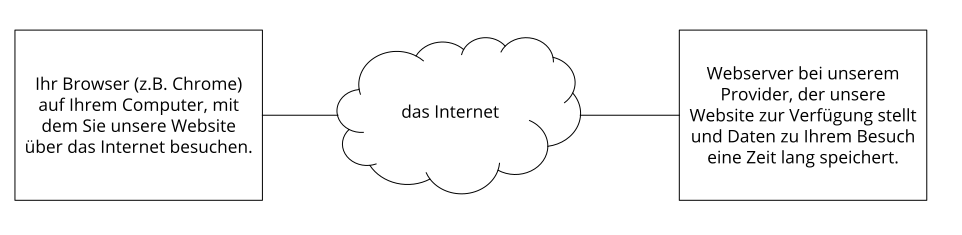
Generally, these files are stored for two weeks and are then automatically deleted. We do not pass these data to others, but we cannot exclude the possibility that this data may be looked at by the authorities in case of illegal conduct.
In short: your visit is logged by our provider (company that runs our website on servers), but we do not pass on your data!
Cookies
Our website uses HTTP-cookies to store user-specific data.
For your better understanding of the following Privacy Policy statement, we will explain to you below what cookies are and why they are in use.
What exactly are cookies?
Every time you surf the internet, you use a browser. Common browsers are for example Chrome, Safari, Firefox, Internet Explorer and Microsoft Edge. Most websites store small text-files in your browser. These files are called cookies.
What should not be dismissed, is that cookies are very useful little helpers. Nearly all websites use cookies. More accurately speaking these are HTTP-cookies, since there are also different cookies for other uses. http-cookies are small files which our website stores on your computer. These cookie files are automatically put into the cookie-folder, which is like the “brain” of your browser. A cookie consists of a name and a value. Moreover, to define a cookie, one or multiple attributes must be specified.
Cookies save certain parts of your user data, such as e.g. language or personal page settings. When you re-open our website, your browser submits these “user specific” information back to our site. Thanks to cookies, our website knows who you are and offers you the settings you are familiar to. In some browsers every cookie has its own file, in others such as Firefox, all cookies are stored in one single file.
There are both first-party cookies and third-party cookies. First-party cookies are created directly by our site, while third-party cookies are created by partner-websites (e.g. Google Analytics). Every cookie is individual, since every cookie stores different data. The expiration time of a cookie also varies – it can be a few minutes, or up to a few years. Cookies are no software-programs and contain no computer viruses, trojans or any other malware. Cookies also cannot access your PC’s information.
This is an example of how cookie-files can look:
name: _ga
value: GA1.2.1326744211.152111766402-9
purpose: differentiation between website visitors
expiration date: after 2 years
A browser should support these minimum sizes:
- at least 4096 bytes per cookie
- at least 50 cookies per domain
- at least 3000 cookies in total
Which types of cookies are there?
What exact cookies we use, depends on the used services. We will explain this in the following sections of the Privacy Policy statement. Firstly, we will briefly focus on the different types of HTTP-cookies.
There are 4 different types of cookies:
Essential Cookies
These cookies are necessary to ensure the basic function of a website. They are needed when a user for example puts a product into their shopping cart, then continues surfing on different websites and comes back later in order to proceed to the checkout. Even when the user closed their window priorly, these cookies ensure that the shopping cart does not get deleted.
Purposive Cookies
These cookies collect info about the user behaviour and record if the user potentially receives any error messages. Furthermore, these cookies record the website’s loading time as well as its behaviour within different browsers.
Target-orientated Cookies
These cookies care for an improved user-friendliness. Thus, information such as previously entered locations, fonts or data in forms stay saved.
Advertising Cookies
These cookies are also known as targeting-Cookies. They serve the purpose of delivering individually adapted advertisements to the user. This can be very practical, but also rather annoying.
Upon your first visit to a website you are usually asked which of these cookie-types you want to accept. Furthermore, this decision will of course also be saved in a cookie.
How can I delete cookies?
You yourself take the decision if and how you want to use cookies. Thus, no matter what service or website cookies are from, you always have the option to delete, deactivate or only partially allow them. Therefore, you can for example block cookies of third parties but allow any other cookies.
If you want change or delete cookie-settings and would like to determine which cookies have been saved to your browser, you can find this info in your browser-settings:
Chrome: Clear, enable and manage cookies in Chrome
Safari: Manage cookies and website data in Safari
Firefox: Clear cookies and site data in Firefox
Internet Explorer: Delete and manage cookies
Microsoft Edge: Delete cookies in Microsoft Edge
If you generally do not want to allow any cookies at all, you can set up your browser in a way, to notify you whenever a potential cookie is about to be set. This gives you the opportunity to manually decide to either permit or deny the placement of every single cookie. The settings for this differ from browser to browser. Therefore, it might be best for you to search for the instructions in Google. If you are using Chrome, you could for example put the search phrase “delete cookies Chrome” or “deactivate cookies Chrome” into Google.
How is my data protected?
There is a “cookie policy” that has been in place since 2009. It states that the storage of cookies requires the user’s consent. However, among the countries of the EU, these guidelines are often met with mixed reactions. In Austria the guidelines have been implemented in § 96 section 3 of the Telecommunications Act (TKG).
If you want to learn more about cookies and do not mind technical documentation, we recommend https://tools.ietf.org/html/rfc6265, the Request for Comments of the Internet Engineering Task Force (IETF) called “HTTP State Management Mechanism”.
Facebook Pixel Privacy Policy
We use Facebook’s Facebook pixel on our website. For that, we have implemented a code on our website. The Facebook pixel is a segment of a JavaScript code, which, in case you arrived on our website via Facebook ads, loads an array or functions that enable Facebook to track your user actions. For example, if you buy a product on our website, the Facebook pixel is triggered and then saves your actions on our website in one or more cookies. These cookies enable Facebook to match your user data (customer data such as IP address, user ID) with the data of your Facebook account. After that, Facebook deletes your data again. The collected data is anonymous as well as inaccessible and can only be used for ad placement purposes. If you are a Facebook user and you are logged in, your visit to our website is automatically assigned to your Facebook user account.
We exclusively want to show our products or services to persons, who are interested in them. With the aid of the Facebook pixel, our advertising measures can get better adjusted to your wishes and interests. Therefore, Facebook users get to see suitable advertisement (if they allowed personalised advertisement). Moreover, Facebook uses the collected data for analytical purposes and for its own advertisements.
In the following we will show you the cookies, which were set on a test page through the integration of the Facebook pixel. Please consider that these cookies are only examples. Depending on the interaction that is made on our website, different cookies are set.
Name: _fbp
Value: fb.1.1568287647279.257405483-6111766402-7
Purpose: Dieses Cookie verwendet Facebook, um Werbeprodukte anzuzeigen.
Expiration date: nach 3 Monaten
Name: fr
Value: 0aPf312HOS5Pboo2r..Bdeiuf…1.0.Bdeiuf.
Purpose: Dieses Cookie wird verwendet, damit Facebook-Pixel auch ordentlich funktioniert.
Expiration date: nach 3 Monaten
Name: comment_author_50ae8267e2bdf1253ec1a5769f48e062111766402-3
Value: Name of the author
Purpose: This cookie saves the text and name of a user who e.g. leaves a comment.
Expiration date: after 12 months
Name: comment_author_url_50ae8267e2bdf1253ec1a5769f48e062
Value: https%3A%2F%2Fwww.testseite…%2F (URL of the author)
Purpose: This cookie saved the URL of the website that the user types into a text box on our website.
Expiration date: after 12 months
Name: comment_author_email_50ae8267e2bdf1253ec1a5769f48e062
Value: email address of the author
Purpose: This cookie saves the email address of the user, if they provided it on the website.
Expiration date: after 12 months
Note: The above-mentioned cookies relate to an individual user behaviour. Moreover, especially concerning the usage of cookies, changes at Facebook can never be ruled out.
If you are registered at Facebook, you can change the settings for advertisements yourself at https://www.facebook.com/ads/preferences/?entry_product=ad_settings_screen. If you are not a Facebook user, you can manage your user based online advertising at https://www.youronlinechoices.com/uk/your-ad-choices. You have the option to activate or deactivate any providers there.
If you want to learn more about Facebook’s data protection, we recommend you the view the company’s in-house data policies at https://www.facebook.com/policy.php.
Google Analytics Privacy Policy
We use the tracking and analysis tool Google Analytics (GA) of the US-American company Google LLC (1600 Amphitheatre Parkway Mountain View, CA 94043, USA). Google Analytics collects data on your actions on our website. Whenever you click a link for example, this action is saved in a cookie and transferred to Google Analytics. With the help of reports which we receive from Google Analytics, we can adapt our website and our services better to your wishes. In the following, we will explain the tracking tool in more detail, and most of all, we will inform you what data is saved and how you can prevent this.
What is Google Analytics?
Google Analytics is a tracking tool with the purpose of conducting data traffic analysis of our website. For Google Analytics to work, there is a tracking code integrated to our website. Upon your visit to our website, this code records various actions you perform on your website. As soon as you leave our website, this data is sent to the Google Analytics server, where it is stored.
Google processes this data and we then receive reports on your user behaviour. These reports can be one of the following:
- Target audience reports: With the help of target audience reports we can get to know our users better and can therefore better understand who is interested in our service.
- Advertising reports: Through advertising reports we can analyse our online advertising better and hence improve it.
- Acquisition reports: Acquisition reports provide us helpful information on how we can get more people enthusiastic about our service.
- Behaviour reports: With these reports, we can find out how you interact with our website. By the means of behaviour reports, we can understand what path you go on our website and what links you click.
- Conversion reports: A conversion is the process of leading you to carry out a desired action due to a marketing message. An example of this would be transforming you from a mere website visitor into a buyer or a newsletter subscriber. Hence, with the help of these reports we can see in more detail, if our marketing measures are successful with you. Our aim is to increase our conversion rate.
- Real time reports: With the help of these reports we can see in real time, what happens on our website. It makes us for example see, we can see how many users are reading this text right now.
Why do we use Google Analytics on our website?
The objective of our website is clear: We want to offer you the best possible service. Google Analytics’ statistics and data help us with reaching this goal.
Statistically evaluated data give us a clear picture of the strengths and weaknesses of our website. On the one hand, we can optimise our page in a way, that makes it easier to be found by interested people on Google. On the other hand, the data helps us to get a better understanding of you as our visitor. Therefore, we can very accurately find out what we must improve on our website, in order to offer you the best possible service. The analysis of that data also enables us to carry out our advertising and marketing measures in a more individual and more cost-effective way. After all, it only makes sense to show our products and services exclusively to people who are interested in them.
What data gets stored by Google Analytics?
With the aid of a tracking code, Google Analytics creates a random, unique ID which is connected to your browser cookie. That way, Google Analytics recognises you as a new user. The next time you visit our site, you will be recognised as a “recurring” user. All data that is collected gets saved together with this very user ID. Only this is how it is made possible for us to evaluate and analyse pseudonymous user profiles.
Your interactions on our website are measures by tags such as cookies and app instance IDs. Interactions are all kinds of actions that you perform on our website. If you are also using other Google systems (such as a Google Account), data generated by Google Analytics can be linked with third-party cookies. Google does not pass on any Google Analytics data, unless we as the website owners authorise it. In case it is required by law, exceptions can occur.
The following cookies are used by Google Analytics:
Name: _ga
Value:2.1326744211.152111766402-5
Purpose: By deafault, analytics.js uses the cookie _ga, to save the user ID. It generally serves the purpose of differenciating between website visitors.
Expiration date: After 2 years
Name: _gid
Value:2.1687193234.152111766402-1
Purpose: This cookie also serves the purpose of differentiating between website users
Expiration date: After 24 hours
Name: _gat_gtag_UA_
Value: 1
Verwendungszweck: It is used for decreasing the demand rate. If Google Analytics is provided via Google Tag Manager, this cookie gets the name _dc_gtm_ .
Expiration date: After 1 minute
Name: AMP_TOKEN
Value: No information
Purpose: This cookie has a token which is used to retrieve the user ID by the AMP Client ID Service. Other possible values suggest a logoff, a request or an error.
Expiration date: After 30 seconds up to one year
Name: __utma
Value:1564498958.1564498958.1564498958.1
Purpose: With this cookie your behaviour on the website can be tracked and the site performance can be measured. The cookie is updated every time the information is sent to Google Analytics.
Expiration date: After 2 years
Name: __utmt
Value: 1
Purpose: Just like _gat_gtag_UA_ this cookie is used for keeping the requirement rate in check.
Expiration date: Afer 10 minutes
Name: __utmb
Value:3.10.1564498958
Purpose: This cookie is used to determine new sessions. It is updated every time new data or information gets sent to Google Analytics.
Expiration date: After 30 minutes
Name: __utmc
Value: 167421564
Purpose: This cookie is used to determine new sessions for recurring visitors. It is therefore a session cookie, and only stays saved until you close the browser again.
Expiration date: After closing the browser
Name: __utmz
Value: m|utmccn=(referral)|utmcmd=referral|utmcct=/
Purpose: This cookie is used to identify the source of our website’s visitor number. This means, that the cookie saves information on where you came to our website from. This could be another site or an advertisement.
Expiration date: After 6 months
Name: __utmv
Value: No information
Purpose: The cookie is used to store custom user data. It gets updated whenever information is sent to Google Analytics.
Expiration date: After 2 years
Note: This list is by no means exhaustive, since Google are repeatedly changing the use of their cookies.
Below we will give you an overview of the most important data that can be evaluated by Google Analytics:
Heatmaps: Google creates so-called Heatmaps an. These Heatmaps make it possible to see the exact areas you click on, so we can get information on what routes you make on our website.
Session duration: Google calls the time you spend on our website without leaving it session duration. Whenever you are inactive for 20 minutes, the session ends automatically.
Bounce rate If you only look at one page of our website and then leave our website again, it is called a bounce.
Account creation: If you create an account or make an order on our website, Google Analytics collects this data.
IP-Address: The IP address is only shown in a shortened form, to make it impossible to clearly allocate it.
Location: Your approximate location and the country you are in can be defined by the IP address. This process is called IP location determination.
Technical information: Information about your browser type, your internet provider and your screen resolution are called technical information.
Source: Both, Google Analytics as well as ourselves, are interested what website or what advertisement led you to our site.
Further possibly stored data includes contact data, potential reviews, playing media (e.g. when you play a video on our site), sharing of contents via social media or adding our site to your favourites. This list is not exhaustive and only serves as general guidance on Google Analytics’ data retention.
How long and where is the data saved?
Google has servers across the globe. Most of them are in America and therefore your data is mainly saved on American servers. Here you can read detailed information on where Google’s data centres are located: https://www.google.com/about/datacenters/inside/locations/?hl=en
Your data is allocated to various physical data mediums. This has the advantage of allowing to retrieve the data faster, and of protecting it better from manipulation. Every Google data centre has respective emergency programs for your data. Hence, in case of a hardware failure at Google or a server error due to natural disasters, the risk for a service interruption stays relatively low.
Google Analytics has a 26 months standardised period of retaining your user data. After this time, your user data is deleted. However, we have the possibility to choose the retention period of user data ourselves. There are the following five options:
- Deletion after 14 months
- Deletion after 26 months
- Deletion after 38 months
- Deletion after 50 months
- No automatical deletion
As soon as the chosen period is expired, the data is deleted once a month. This retention period applies to any of your data which is linked to cookies, user identification and advertisement IDs (e.g. cookies of the DoubleClick domain). Any report results are based on aggregated information and are stored independently of any user data. Aggregated information is a merge of individual data into a single and bigger unit.
How can I delete my data or prevent data retention?
Under the provisions of the European Union’s data protection law, you have the right to obtain information on your data and to update, delete or restrict it. With the help of a browser add on that can deactivate Google Analytics’ JavaScript (ga.js, analytics.js, dc.js), you can prevent Google Analytics from using your data. You can download this add on at https://tools.google.com/dlpage/gaoptout?hl=en-GB. Please consider that this add on can only deactivate any data collection by Google Analytics.
Should you generally want to deactivate, delete or manage all cookies (independently of Google Analytics), you can use one of the guides that are available for any browser:
Chrome: Clear, enable and manage cookies in Chrome
Safari: Manage cookies and website data in Safari
Firefox: Clear cookies and site data in Firefox
Internet Explorer: Delete and manage cookies
Microsoft Edge: Delete cookies in Microsoft Edge
Google Analytics is an active participant of the EU-U.S. Privacy Shield Framework, which regulates correct and save transfer of personal data.
You can find more information on this at https://www.privacyshield.gov/participant?id=a2zt000000001L5AAI&tid=111766402. We hope we were able to make you more familiar with the most important information on Google Analytics’ data processing. If you want to learn more about the tracking service, we recommend both of the following links: https://marketingplatform.google.com/about/analytics/terms/gb/ and https://support.google.com/analytics/answer/6004245?hl=en.
Email-Marketing
Of course, we want to stay in contact with you and keep you in the loop of the most important news about our company. For this, we use email marketing, which is an essential part of our online marketing. If you agree to this or if it is permitted by law, we will send you newsletters, emails or other notifications. When the term “newsletter” is used in the following text, it mainly refers to emails that are sent regularly.
How can you register for our Email-Marketing?
If you want to participate in our email marketing (usually via newsletter), you usually have to register with your email address only. You will simply have to fill an online form and submit it. However, we may also ask you to fill in your title and name so we will be able to address you more personally.
Generally, the registration for newsletters is carried out with the so-called “double opt-in procedure”. After registering for our newsletter on our website, you will receive an email for you to confirm the newsletter registration. This will ensure that you own your email address and that no one registers with an email address that is not owned by them. Every single registration is stored either by us or by a notification tool we use. This is necessary for us to ensure that registration processes are legally correct. Therefore, the time of your registration, the time of confirmation of your registration and your IP address are usually retained. It will also be logged if you make changes to your stored data.
How long can we store your email address?
If you unsubscribe from our email/newsletter distribution list, we may store your address for up to three years on the basis of our legitimate interests, so that we can still prove your consent at the time. We are only allowed to process this data if we have to defend ourselves against any claims.
However, if you confirm that you have given us your consent to subscribe to the newsletter, you can submit an individual request for deletion at any time. Should you object to your consent permanently, we reserve the right to save your email address in a blacklist. We will of course keep your email address for as long as you are voluntarily subscribed to our newsletter.
On what legal basis do we operate email marketing?
Our newsletter is sent on the basis of your consent. This means that we are only allowed to send you a newsletter if you have actively registered for it beforehand. If consent is not required, newsletters will be sent on the basis of the legitimate interest in direct marketing, provided it is legally permitted. Should we commission a service provider, this will be done on the basis of our legitimate interest also. We record your registration process for the purpose of using it as proof that it is in compliance with our laws.
What is in our newsletters?
Of course, we do not want to bother you with our newsletter in any way. Therefore, we really strive to offer only relevant and interesting content, such as more information about our company, our services or our products. Since we are continuously improving our offers, our newsletter will always update you on any news or special offers and lucrative promotions.
If we commission a service provider with a professional mailing tool for our email marketing, we do this in order to be able to offer you our newsletter fast and securely.
Which data are retained?
If you subscribe to our newsletter via our website, you will confirm your membership in our email list via an email that we will send to you. In addition to your IP address and email address, your name, address and telephone number may also be saved. However, this will only be done if you agree to this data retention. Moreover, information about your device or the type of content you prefer on our website may also be stored. In the “Automatic data storage” section you can find out more about how your data is stored when you visit a website.
You can find information on special email marketing services in the following sections, provided the information you are looking for is available.
How can I cancel my subscription?
You have the option to cancel your newsletter subscription at any time. All you have to do is revoke your consent to the newsletter subscription. This usually only takes a few minutes or a few clicks. Most of the time you will find a link directly in our newsletter, with which you will be able to cancel the subscription. Should you not be able to find the link in the newsletter, you can contact us by email and we will cancel your newsletter subscription for you.
Google Ads (Google AdWords) Conversion Tracking Privacy Policy
We use Google Ads (previously Google AdWords) as an online marketing measure, to advertise our products and services. Thus, we want to draw more people’s attention on the internet to the high quality of our offers. As part of our advertising measures with Google Ads, we use the conversion tracking of Google LLC., 1600 Amphitheatre Parkway, Mountain View, CA 94043, USA (“Google”) on our website. With the aid of this free tracking tool we can tailor our advertising offer better to your interests and needs. In the following article we will explain, why we use conversion tracking, what data gets saved and how you can prevent this data retention.
What is Google Ads conversion tracking?
Google Ads (previously Google AdWords) is the internal online advertising sxstem of the company Google LLC. We are convinced of our offer‘s quality and would like as many people as possible to discover our website. For this, Google Ads offers the best platform within the online environment. Of course, we also want to get an overview of the cost-benefit factor of our advertising campaigns. Thence, we use Google Ads’ conversion tracking tool.
But what is a conversion actually? A conversion occurs, when you turn from an interested visitor into an acting website visitor. This happens every time you click on our ad and then make another action, such as paying a visit to our website. With Google’s conversion tracking tool, we can understand what happens after a user clicks our Google ad. It shows us for instance if products get bought, services are used or whether users have subscribed to our newsletter.
Why do we use Google Ads conversion tracking on our website?
We use Google Ads to show our offer also across other websites. Our aim is for our advertising campaigns to reach only those people, who are interested in our offers. With the conversion tracking tool, we see what keywords, ads, ad groups and campaigns lead to the desired customer actions. We see how many customers interact with our ads on a device, to then convert. With this data we can calculate our cost-benefit-factor, measure the success of individual ad campaigns and therefore optimise our online marketing measures. With the help of the obtained data we can give our website a more interesting design and customise our advertising offer better to your needs.
What data is stored with Google Ads conversion tracking?
For a better analysis of certain user actions, we have integrated a conversion tracking tag, or code snippet to our website. Therefore, if you click one of our Google ads, a Google domain stores the cookie “conversion” on your computer (usually in the browser) or on your mobile device. Cookies are little text files that save information on your computer.
Here are data of the most significant cookies for Google’s conversion tracking:
Name: Conversion
Value: EhMI_aySuoyv4gIVled3Ch0llweVGAEgt-mr6aXd7dYlSAGQ111766402-3
Purpose: This cookie saves every conversion you make on our website after you came to us via a Google ad.
Expiry date: after 3 months
Name: _gac
Value: 1.1558695989.EAIaIQobChMIiOmEgYO04gIVj5AYCh2CBAPrEAAYASAAEgIYQfD_BwE
Purpose: This is a classic Google Analytics Cookie that records various actions on our website.
Expiry date: after 3 months
Note: The cookie _gac only appears in connection with Google Analytics. The above list does not claim to be exhaustive, as Google repeatedly change the cookies they use for analytical evaluation.
As soon as you complete an action on our website, Google identifies the cookie and saves your action as a so-called conversion. For as long as you surf our website, provided the cookie has not expired, both Google and us can determine that you found your way to us via a Google ad. Then, the cookie is read and sent back to Google Ads, together with the conversion data. Moreover, other cookies may also be used for measuring conversions. Google Ads‘ conversion tracking can be fine-tuned and improved with the aid of Google Analytics. Furthermore, ads which Google displays in various places across the web, might be placed under our domain with the name “__gads” or “_gac”.
Since September 2017, analytics.js retains various campaign information with the _gac cookie. This cookie stores data, as soon as you open one of our sites that has been set up for Google Ads’ auto-tagging. In contrast to cookies that are placed for Google domains, Google can only read these conversion cookies when you are on our website. We do neither collect nor receive any personal data. We do obtain a report with statistical evaluations by Google. With the help thereof, we can not only see the total number of users who clicked our ad, but also what advertising measures were well received.
How long and where is the data stored?
At this point we want to reiterate, that we have no influence on how Google use the collected data. According to Google, the data are encrypted and saved on a secure server. In most cases, conversion cookies expire after 30 days, and do not transmit any personalised data. The cookies named “conversion“ and “_gac“ (which is used with Google Analytics) have an expiry date of 3 months.
How can I delete my data or prevent data retention?
You have the possibility to opt out of Google Ads’ conversion tracking. The conversion tracking can be blocked by deactivating the conversion tracking cookie via your browser. If you do this, you will not be considered for the statistic of the tracking tool. You can change the cookie settings in your browser anytime. Doing so, works a little different in every browser. Hence, in the following you will find an instruction on how to manage cookies in your browser:
Chrome: Clear, enable and manage cookies in Chrome
Safari: Manage cookies and website data in Safari
Firefox: Clear cookies and site data in Firefox
Internet Explorer: Delete and manage cookies
Microsoft Edge: Delete cookies in Microsoft Edge
If you generally do not want to allow any cookies at all, you can set up your browser to notify you whenever a potential cookie is about to be set. This lets you decide upon permitting or denying the cookie’s placement. By downloading and installing the browser plugin at https://support.google.com/ads/answer/7395996 you can also deactivate all “advertising cookies”. Please consider that by deactivating these cookies, you cannot prevent all advertisements, only personalised ads.
Due to the certification for the American-European data protection convention “Privacy Shield”, the American corporation Google LLC must comply to the EU’s applicable data protection laws. If you want to find out more on data protection at Google, we recommend Google’s general Privacy Policy: https://policies.google.com/privacy?hl=en-GB.
Facebook Data Policy
We use selected Facebook tools on our website. Facebook is a social media network of the company Facebook Ireland Ltd., 4 Grand Canal Square, Grand Canal Harbour, Dublin 2 Ireland. With the aid of this tool we can provide the best possible offers to you and anyone interested in our products and services. In the following we will give you an overview on the different Facebook tools, as well as on what data is sent to Facebook and how you can delete these data.
What are Facebook tools?
Along with many other products, Facebook also offers so called “Facebook Business Tools”. This is Facebook’s official name for the tools, but it is not very common. Therefore, we decided to merely call them “Facebook tools”. They include the following:
- Facebook-Pixel
- social plugins (e.g. the “Like” or “Share“ button)
- Facebook Login
- Account Kit
- APIs (application programming interface)
- SDKs (Softwart developmept kits)
- Plattform-integrations
- Plugins
- Codes
- Specifications
- Documentations
- Technologies and Services
With these tools Facebook can extend its services and is able to receive information on user activities outside of Facebook.
Why do we use Facebook tools on our website?
We only want to show our services and products to people who are genuinely interested in them. With the help of advertisements (Facebook Ads) we can reach exactly these people. However, to be able to show suitable adverts to users, Facebook requires additional information on people’s needs and wishes. Therefore, information on the user behaviour (and contact details) on our website, are provided to Facebook. Consequently, Facebook can collect better user data and is able to display suitable adverts for our products or services. Thanks to the tools it is possible to create targeted, customised ad campaigns of Facebook.
Facebook calls data about your behaviour on our website “event data” and uses them for analytics services. That way, Facebook can create “campaign reports” about our ad campaigns’ effectiveness on our behalf. Moreover, by analyses we can get a better insight in how you use our services, our website or our products. Therefore, some of these tools help us optimise your user experience on our website. With the social plugins for instance, you can share our site’s contents directly on Facebook.
What data is saved by the Facebook tools?
With the use of the Facebook tools, personal data (customer data) may be sent to Facebook. Depending on the tools used, customer data such as name, address, telephone number and IP address may be transmitted.
Facebook uses this information to match the data with the data it has on you (if you are a Facebook member). However, before the customer data is transferred to Facebook, a so called “Hashing” takes place. This means, that a data record of any size is transformed into a string of characters, which also has the purpose of encrypting data.
Moreover, not only contact data, but also “event data“ is transferred. These data are the information we receive about you on our website. To give an example, it allows us to see what subpages you visit or what products you buy from us. Facebook does not disclose the obtained information to third parties (such as advertisers), unless the company has an explicit permission or is legally obliged to do so. Also, “event data“ can be linked to contact information, which helps Facebook to offer improved, customised adverts. Finally, after the previously mentioned matching process, Facebook deletes the contact data.
To deliver optimised advertisements, Facebook only uses event data, if they have been combined with other data (that have been collected by Facebook in other ways). Facebook also uses event data for the purposes of security, protection, development and research. Many of these data are transmitted to Facebook via cookies. Cookies are little text files, that are used for storing data or information in browsers. Depending on the tools used, and on whether you are a Facebook member, a different number of cookies are placed in your browser. In the descriptions of the individual Facebook tools we will go into more detail on Facebook cookies. You can also find general information about the use of Facebook cookies at https://www.facebook.com/policies/cookies.
How long and where are the data saved?
Facebook fundamentally stores data, until they are no longer of use for their own services and products. Facebook has servers for storing their data all around the world. However, customer data is cleared within 48 hours after they have been matched with their own user data.
How can I delete my data or prevent data retention?
In accordance with the General Data Protection Regulation (GDPR) you have the right of information, rectification, transfer and deletion of your data.
The collected data is only fully deleted, when you delete your entire Facebook account. Deleting your Facebook account works as follows:
1) Click on settings in the top right side in Facebook.
2) Then, click “Your Facebook information“ in the left column.
3) Now click on “Deactivation and deletion”.
4) Choose “Permanently delete account“ and then click on “Continue to account deletion“.
5) Enter your password, click on “continue“ and then on “Delete account“.
The retention of data Facebook receives via our site is done via cookies (e.g. with social plugins), among others. You can deactivate, clear or manage both all and individual cookies in your browser. How this can be done differs depending on the browser you use. The following instructions show, how to manage cookies in your browser:
Chrome: Clear, enable and manage cookies in Chrome
Safari: Manage cookies and website data in Safari
Firefox: Clear cookies and site data in Firefox
Internet Explorer: Delete and manage cookies
Microsoft Edge: Delete cookies in Microsoft Edge
If you generally do not want to allow any cookies at all, you can set up your browser to notify you whenever a cookie is about to be set. This gives you the opportunity to decide upon the permission or deletion of every single cookie.
Facebook is an active participant in the EU-U.S. Privacy Shield Framework, which regulates correct and secure transfer of personal data. You can find more information at https://www.privacyshield.gov/participant?id=a2zt0000000GnywAAC. We hope we could give you an understanding of the most important information about the use of Facebook tools and data processing. If you want to find out more on how Facebook use your data, we recommend reading the data policies at https://www.facebook.com/about/privacy/update.
Facebook Social Plugins Privacy Policy
We installed so-called social plugins from Facebook Inc. to our website. You can recognise these buttons by the classic Facebook logo, the “Like” button (hand with raised thumb) or by a “Facebook plugin” label. A social plugin is a small part of Facebook that is integrated into our page. Each plugin has its own function. The most used functions are the well-known “Like” and “Share” buttons.
Facebook offers the following social plugins:
- “Save” button
- “Like” button, Share, Send and Quote
- Page plugin
- Comments
- Messenger plugin
- Embedded posts and video player
- Group Plugin
At https://developers.facebook.com/docs/plugins you will find more information on how the individual plugins are used. On the one hand, we use the social plug-ins to offer you a better user experience on our site, and on the other hand because Facebook can optimise our advertisements with it.
If you have a Facebook account or have already visited facebook.com, Facebook has already placed at least one cookie in your browser. In this case, your browser sends information to Facebook via this cookie as soon as you visit our website or interact with social plugins (e.g. the “Like” button).
The received information will be deleted or anonymised within 90 days. According to Facebook, this data includes your IP address, the websites you have visited, the date, time and other information relating to your browser.
In order to prevent Facebook from collecting much data and matching it with your Facebook data during your visit to our website, you must log out of Facebook while you visit our website.
If you are not logged in to Facebook or do not have a Facebook account, your browser sends less information to Facebook because you have fewer Facebook cookies. Nevertheless, data such as your IP address or which website you are visiting can be transmitted to Facebook. We would like to explicitly point out that we do not know what exact data is collected. However, based on our current knowledge, we want to try informing you as best we can about data processing. You can also read about how Facebook uses the data in the company’s data policy at https://www.facebook.com/about/privacy/update.
At least the following cookies are set in your browser when you visit a website with social plugins from Facebook:
Name: dpr
Value: no information
Purpose:This cookie is used to make the social plugins work on our website.
Expiry date: after end of session
Name: fr
Value: 0jieyh4111766402c2GnlufEJ9..Bde09j…1.0.Bde09j
Purpose:The cookie is also necessary for the plugins to function properly
Expiry date: after 3 months
Note: These cookies were set after our test and may be placed even if you are not a Facebook member.
If you are registered with Facebook, you can change your settings for advertisements yourself at https://www.facebook.com/ads/preferences/?entry_product=ad_settings_screen. If you are not a Facebook user, you can go to https://www.youronlinechoices.com/uk/your-ad-choices/ and manage your usage-based online advertising. There you have the option to deactivate or activate providers.
If you want to learn more about Facebook’s data protection, we recommend the company’s own data policies at https://www.facebook.com/policy.php.
Facebook Login Privacy Policy
We integrated the convenient Facebook Login to our website. With it, you can easily log into our site with your Facebook account, without having to create a new user account. If you decide to register via the Facebook Login, you will be redirected to the social media network Facebook. There, you can log in with your Facebook user data. By using this method to log in, data on you and your user behaviour is stored and transmitted to Facebook.
To save the data, Facebook uses various cookies. In the following we will show you the most significant cookies that are placed in your browser or that already exist when you log into our site via the Facebook Login:
Name: fr
Value: 0jieyh4c2GnlufEJ9..Bde09j…1.0.Bde09j
Purpose: This cookie is used to make the social plugin function optimally on our website.
Expiry date: after 3 months
Name: datr
Value: 4Jh7XUA2111766402SEmPsSfzCOO4JFFl
Purpose: Facebook sets the “datr” cookie, when a web browser accesses facebook.com. The cookie helps to identify login activities and protect users.
Expiry date: after 2 years
Name: _js_datr
Value: deleted
Purpose: Facebook sets this session cookie for tracking purposes, even if you do not have a Facebook account or are logged out.
Expiry date: after the end of the session
Note: The cookies we stated are only a small range of the cookies which are available to Facebook. Other cookies include for example _ fbp, sb or wd. It is not possible to disclose an exhaustive list, since Facebook have a multitude of cookies at their disposal which they use in variation.
On the one hand, Facebook Login enables a fast and easy registration process. On the other hand, it gives us the opportunity to share data with Facebook. In turn, we can customise our offer and advertising campaigns better to your needs and interests. The data we receive from Facebook by this means, is public data such as
- your Facebook name
- your profile picture
- your stored email address
- friends lists
- button clicks (e.g. “Like“ button)
- date of birth
- language
- place of residence
In return, we provide Facebook with information about your activities on our website. These include information on the terminal device you used, which of our subpages you visit, or what products you have bought from us.
By using Facebook Login, you agree to the data processing. You can terminate this agreement anytime. If you want to learn more about Facebook’s data processing, we recommend you to read Facebook’s Data Policy at https://www.facebook.com/policy.php.
If you are registered with Facebook, you can change your advertisement settings anytime at https://www.facebook.com/ads/preferences/?entry_product=ad_settings_screen.
Instagram Privacy Policy
We have integrated functions of Instagram to our website. Instagram is a social media platform of the company Instagram LLC, 1601 Willow Rd, Menlo Park CA 94025, USA. Since 2012, Instagram is a subsidiary company of Facebook Inc. and is a part of Facebook’s products. The inclusion of Instagram’s contents on our website is called embedding. With this, we can show you Instagram contents such as buttons, photos or videos directly on our website. If you open websites of our online presence, that have an integrated Instagram function, data gets transmitted to, as well as stored and processed by Instagram. Instagram uses the same systems and technologies as Facebook. Therefore, your data will be processed across all Facebook firms.
In the following, we want to give you a more detailed insight on why Instagram collects data, what data these are and how you can control data processing. As Instagram belongs to Facebook Inc., we have, on the one hand received this information from the Instagram guidelines, and on the other hand from Facebook’s Data Policy.
What is Instagram?
Instagram is one of the most famous social media networks worldwide. Instagram combines the benefits of a blog with the benefits of audio-visual platforms such as YouTube or Vimeo. To “Insta“ (how the platform is casually called by many users) you can upload photos and short videos, edit them with different filters and also share them to other social networks. Also, if you do not want to be active on Instagram yourself, you can just follow other interesting users.
Why do we use Instagram on our website?
Instagram is a social media platform whose success has skyrocketed within recent years. Naturally, we have also reacted to this boom. We want you to feel as comfortable as possible on our website. Therefore, we attach great importance to diversified contents. With the embedded Instagram features we can enrich our content with helpful, funny or exciting Instagram contents. Since Instagram is a subsidiary company of Facebook, the collected data can also serve us for customised advertising on Facebook. Hence, only persons who are genuinely interested in our products or services can see our ads.
Instagram also uses the collected data for tracking and analysis purposes. We receive summarised statistics and therefore more insight to your wishes and interests. It is important to mention that these reports do not identify you personally.
What data is saved by Instagram?
Whenever you land on one of our sites, which have Instagram functions (i.e. Instagram photos or plugins) integrated to them, your browser automatically connects with Instagram’s servers. Thereby, data is sent to, as well as saved and processed by Instagram. This always happens, whether you have an Instagram account or not. Moreover, it includes information on our website, your computer, your purchases, the advertisements you see and on how you use our offer. The date and time of your interaction is also stored. If you have an Instagram account or are logged in, Instagram saves significantly more data on you.
Facebook distinguishes between customer data and event data. We assume this is also the case for Instagram. Customer data are for example names, addresses, phone numbers and IP addresses. These data are only transmitted to Instagram, if they have been “hashed” first. Thereby, a set of data is transformed into a string of characters, which encrypts any contact data. Moreover, the aforementioned “event data“ (data on your user behaviour) is transmitted as well. It is also possible, that contact data may get combined with event data. The collected data data is matched with any data Instagram already has on you.
Furthermore, the gathered data are transferred to Facebook via little text files (cookies) which usually get set in your browser. Depending on the Instagram function used, and whether you have an Instagram account yourself, the amount of data that gets stored varies.
We assume data processing on Instagram works the same way as on Facebook. Therefore, if you have an account on Instagram or have visited www.instagram.com, Instagram has set at least one cookie. If this is the case, your browser uses the cookie to send information to Instagram, as soon as you come across an Instagram function. No later than 90 days (after matching) the data is deleted or anonymised. Even though we have studied Instagram’s data processing in-depth, we cannot tell for sure what exact data Instagram collects and retains.
In the following we will show you a list of the least cookies placed in your browser when click on an Instagram function (e.g. button or an Insta picture). In our test we assume you do not have an Instagram account, since if you would be logged in to your Instagram account, your browser would place significantly more cookies.
The following cookies were used in our test:
Name: csrftoken
Value: “”
Purpose: This cookie is most likely set for security reasons to prevent falsifications of requests. We could not find out more information on it.
Expiry date: after one year
Name: mid
Value: “”
Purpose: Instagram places this cookie to optimise its own offers and services in- and outside of Instagram. The cookie allocates a unique user ID.
Expiry date: after end of session
Name: fbsr_111766402124024
Value: no information
Purpose: This cookie stores the login request of Instagram app users. Expiry date: after end of session
Name: rur
Value: ATN
Purpose: This is an Instagram cookie which guarantees functionality on Instagram.
Expiry date: after end of session
Name: urlgen
Value: “{”194.96.75.33”: 1901}:1iEtYv:Y833k2_UjKvXgYe111766402”
Purpose: This cookie serves Instagram’s marketing purposes.
Expiry date: after end of session
Note: We do not claim this list to be exhaustive. The cookies that are placed in each individual case, depend on the functions embedded as well as on your use of Instagram.
How long and where are these data stored?
Instagram shares the information obtained within the Facebook businesses with external partners and persons you are globally connected with. Data processing is done according to Facebook’s internal data policy. Your data is distributed to Facebook’s servers across the world, partially for security reasons. Most of these servers are in the USA.
How can I delete my data or prevent data retention?
Thanks to the General Data Protection Regulation (GDPR), you have the right of information, rectification, transfer and deletion of your data. Furthermore, you can manage your data in Instagram’s settings. If you want to delete your data on Instagram completely, you will have to delete your Instagram account permanently.
And this is how an Instagram account can be deleted:
First, open the Instagram app. Then, navigate to your profile page, select the three bars in the top right, choose “Settings” and then click “Help”. Now, you will be redirected to the company’s website, where you must click on “Managing Your Account” and then “Delete Your Account”.
When you delete your account completely, Instagram deletes posts such as your photos and status updates. Any information other people shared about you are not a part of your account and do therefore not get deleted.
As mentioned before, Instagram primarily stores your data via cookies. You can manage, deactivate or delete these cookies in your browser. Depending on your browser, managing them varies a bit. We will show you the instructions of the most relevant browsers here.
Chrome: Clear, enable and manage cookies in Chrome
Safari: Manage cookies and website data in Safari
Firefox: Clear cookies and site data in Firefox
Internet Explorer: Delete and manage cookies
Microsoft Edge: Delete cookies in Microsoft Edge
Generally, you can set your browser to notify you whenever a cookie is about to be set. Then you can individually decide upon the permission of every cookie.
Instagram is a subsidiary company of Facebook Inc. and Facebook is an active participant in the EU-U.S. Privacy Shield Framework. This framework regulates correct transfer between the USA and the European Union. At https://www.privacyshield.gov/participant?id=a2zt0000000GnywAAC you can find out more about this. We gave our best to make you familiar with the most important information on data processing by Instagram. At https://help.instagram.com/519522125107875 you can find out more on Instagram’s data policies.
LinkedIn Privacy Policy
On our website we use social plugins from the social media network LinkedIn, of the LinkedIn Corporation, 2029 Stierlin Court, Mountain View, CA 94043, USA. Social plugins can be feeds, content sharing or a link to our LinkedIn page. Social plugins are clearly marked with the well-known LinkedIn logo and for example allow sharing interesting content directly via our website. Moreover, LinkedIn Ireland Unlimited Company Wilton Place in Dublin is responsible for data processing in the European Economic Area and Switzerland.
By embedding these plugins, data can be sent to, as well as stored and processed by LinkedIn. In this privacy policy we want to inform you what data this is, how the network uses this data and how you can manage or prevent data retention.
What is LinkedIn?
LinkedIn is the largest social network for business contacts. In contrast to e.g. Facebook, LinkedIn focuses exclusively on establishing business connections. Therefore, companies can present services and products on the platform and establish business relationships. Many people also use LinkedIn to find a job or to find suitable employees for their own company. In Germany alone, the network has over 11 million members. In Austria there are about 1.3 million.
Why do we use LinkedIn on our website?
We know how busy you are. You just cannot keep up with following every single social media channel. Even if it would really be worth it, as it is with our channels, since we keep posting interesting news and articles worth spreading. Therefore, on our website we have created the opportunity to share interesting content directly on LinkedIn, or to refer directly to our LinkedIn page. We consider built-in social plugins as an extended service on our website. The data LinkedIn collects also help us to display potential advertising measures only to people who are interested in our offer.
What data are stored by LinkedIn?
LinkedIn stores no personal data due to the mere integration of social plugins. LinkedIn calls the data generated by plugins passive impressions. However, if you click on a social plugin to e.g. share our content, the platform stores personal data as so-called “active impressions”. This happens regardless of whether you have a LinkedIn account or not. If you are logged in, the collected data will be assigned to your account.
When you interact with our plugins, your browser establishes a direct connection to LinkedIn’s servers. Through that, the company logs various usage data. These may include your IP address, login data, device information or information about your internet or cellular provider. If you use LinkedIn services via your smartphone, your location may also be identified (after you have given permission). Moreover, LinkedIn can share these data with third-party advertisers in “hashed” form. Hashing means that a data set is transformed into a character string. This allows data to be encrypted, which prevents persons from getting identified.
Most data on of your user behaviour is stored in cookies. These are small text files that usually get placed in your browser. Furthermore, LinkedIn can also use web beacons, pixel tags, display tags and other device recognitions.
Various tests also show which cookies are set when a user interacts with a social plug-in. We do not claim for the information we found to be exhaustive, as it only serves as an example. The following cookies were set without being logged in to LinkedIn:
Name: bcookie
Value: =2&34aab2aa-2ae1-4d2a-8baf-c2e2d7235c16111766402-
Purpose: This cookie is a so-called “browser ID cookie” and stores your identification number (ID).
Expiry date: after 2 years
Name: lang
Value: v=2&lang=en-gb
Purpose:This cookie saves your default or preferred language.
Expiry date: after end of session
Name: lidc
Value: 1818367:t=1571904767:s=AQF6KNnJ0G111766402…
Purpose:This cookie is used for routing. Routing records how you found your way to LinkedIn and how you navigate through the website.
Expiry date: after 24 hours
Name: rtc
Value: kt0lrv3NF3x3t6xvDgGrZGDKkX
Purpose:No further information could be found about this cookie.
Expiry date: after 2 minutes
Name: JSESSIONID
Value: ajax:1117664022900777718326218137
Purpose: This is a session cookie that LinkedIn uses to maintain anonymous user sessions through the server.
Expiry date: after end of session
Name: bscookie
Value: “v=1&201910230812…
Purpose: This cookie is a security cookie. LinkedIn describes it as a secure browser ID cookie.
Expiry date: after 2 years
Name: fid
Value: AQHj7Ii23ZBcqAAAA…
Purpose: We could not find any further information about this cookie.
Expiry date: after 7 days
Note: LinkedIn also works with third parties. That is why we identified the Google Analytics cookies _ga and _gat in our test.
How long and where are the data stored?
In general, LinkedIn retains your personal data for as long as the company considers it necessary for providing its services. However, LinkedIn deletes your personal data when you delete your account. In some exceptional cases, LinkedIn keeps some summarised and anonymised data, even account deletions. As soon as you delete your account, it may take up to a day until other people can no longer see your data. LinkedIn generally deletes the data within 30 days. However, LinkedIn retains data if it is necessary for legal reasons. Also, data that can no longer be assigned to any person remains stored even after the account is closed. The data are stored on various servers in America and presumably also in Europe.
How can I delete my data or prevent data retention?
You have the right to access and delete your personal data at any time. In your LinkedIn account you can manage, change and delete your data. Moreover, you can request a copy of your personal data from LinkedIn.
How to access account data in your LinkedIn profile:
In LinkedIn, click on your profile icon and select the “Settings & Privacy” section. Now click on “Privacy” and then on the section “How LinkedIn uses your data on”. Then, click “Change” in the row with “Manage your data and activity”. There you can instantly view selected data on your web activity and your account history.
In your browser you also have the option of preventing data processing by LinkedIn. As mentioned above, LinkedIn stores most data via cookies that are placed in your browser. You can manage, deactivate or delete these cookies. Depending on which browser you have, these settings work a little different. You can find the instructions for the most common browsers here:
Chrome: Clear, enable and manage cookies in Chrome
Safari: Manage cookies and website data in Safari
Firefox: Clear cookies and site data in Firefox
Internet Explorer: Delete and manage cookies
Microsoft Edge: Delete cookies in Microsoft Edge
You can generally set your browser to always notify you when a cookie is about to be set. Then you can always decide individually whether you want to allow the cookie or not.
LinkedIn is an active participant in the EU-U.S. Privacy Shield Frameworks. This framework ensures correct data transmission between the USA and the European Union. You can find out more about it at https://www.privacyshield.gov/participant?id=a2zt0000000L0UZAA0. We gave our best to provide you the most essential information about LinkedIn’s data processing. At https://www.linkedin.com/legal/privacy-policy you can find out more about data processing of the social media network LinkedIn.
Pinterest Privacy Policy
On our website we use buttons and widgets of the social media network Pinterest, by the company Pinterest Inc., 808 Brannan Street, San Francisco, CA 94103, USA.
By opening pages that use these functions, data (IP address, browser data, date and time, cookies) are transmitted to, and stored and evaluated by Pinterest.
The privacy guidelines on what information Pinterest collects and how they use it, can be found at https://policy.pinterest.com/en-gb/privacy-policy.
YouTube Privacy Policy
We have integrated YouTube videos to our website. Therefore, we can show you interesting videos directly on our site. YouTube is a video portal, which has been a subsidiary company of Google LLC since 2006. The video portal is operated by YouTube, LLC, 901 Cherry Ave., San Bruno, CA 94066, USA. When you visit a page on our website that contains an embedded YouTube video, your browser automatically connects to the servers of YouTube or Google. Thereby, certain data are transferred (depending on the settings). Google is responsible for YouTube’s data processing and therefore Google’s data protection applies.
In the following we will explain in more detail which data is processed, why we have integrated YouTube videos and how you can manage or clear your data.
What is YouTube?
On YouTube, users can watch, rate, comment or upload videos for free. Over the past few years, YouTube has become one of the most important social media channels worldwide. For us to be able to display videos on our website, YouTube provides a code snippet that we have integrated to our website.
Why do we use YouTube videos on our website?
YouTube is the video platform with the most visitors and best content. We strive to offer you the best possible user experience on our website, which of course includes interesting videos. With the help of our embedded videos, we can provide you other helpful content in addition to our texts and images. Additionally, embedded videos make it easier for our website to be found on the Google search engine. Moreover, if we place ads via Google Ads, Google only shows these ads to people who are interested in our offers, thanks to the collected data.
What data is stored by YouTube?
As soon as you visit one of our pages with an integrated YouTube, YouTube places at least one cookie that stores your IP address and our URL. If you are logged into your YouTube account, by using cookies YouTube can usually associate your interactions on our website with your profile. This includes data such as session duration, bounce rate, approximate location, technical information such as browser type, screen resolution or your Internet provider. Additional data can include contact details, potential ratings, shared content via social media or YouTube videos you added to your favourites.
If you are not logged in to a Google or YouTube account, Google stores data with a unique identifier linked to your device, browser or app. Thereby, e.g. your preferred language setting is maintained. However, many interaction data cannot be saved since less cookies are set.
In the following list we show you cookies that were placed in the browser during a test. On the one hand, we show cookies that were set without being logged into a YouTube account. On the other hand, we show you what cookies were placed while being logged in. We do not claim for this list to be exhaustive, as user data always depend on how you interact with YouTube.
Name: YSC
Value: b9-CV6ojI5Y111766402-1
Purpose: This cookie registers a unique ID to store statistics of the video that was viewed.
Expiry date: after end of session
Name: PREF
Value: f1=50000000
Purpose: This cookie also registers your unique ID. Google receives statistics via PREF on how you use YouTube videos on our website.
Expiry date: after 8 months
Name: GPS
Value: 1
Purpose: This cookie registers your unique ID on mobile devices to track GPS locations.
Expiry date: after 30 minutes
Name: VISITOR_INFO1_LIVE
Value: 95Chz8bagyU
Purpose: This cookie tries to estimate the user’s internet bandwith on our sites (that have built-in YouTube videos).
Expiry date: after 8 months
Further cookies that are placed when you are logged into your YouTube account:
Name: APISID
Value: zILlvClZSkqGsSwI/AU1aZI6HY7111766402-
Purpose: This cookie is used to create a profile on your interests. This data is then used for personalised advertisements.
Expiry date: after 2 years
Name: CONSENT
Value: YES+AT.de+20150628-20-0
Purpose: The cookie stores the status of a user’s consent to the use of various Google services. CONSENT also provides safety measures to protect users from unauthorised attacks.
Expiry date: after 19 years
Name: HSID
Value: AcRwpgUik9Dveht0I
Purpose: This cookie is used to create a profile on your interests. This data helps to display customised ads.
Expiry date: after 2 years
Name: LOGIN_INFO
Value: AFmmF2swRQIhALl6aL…
Purpose: This cookie stores information on your login data.
Expiry date: after 2 years
Name: SAPISID
Value: 7oaPxoG-pZsJuuF5/AnUdDUIsJ9iJz2vdM
Purpose: This cookie identifies your browser and device. It is used to create a profile on your interests.
Expiry date: after 2 years
Name: SID
Value: oQfNKjAsI111766402-
Purpose: This cookie stores your Google Account ID and your last login time, in a digitally signed and encrypted form.
Expiry date: after 2 years
Name: SIDCC
Value: AN0-TYuqub2JOcDTyL
Purpose: This cookie stores information on how you use the website and on what advertisements you may have seen before visiting our website.
Expiry date: after 3 months
How long and where is the data stored?
The data YouTube receive and process on you are stored on Google’s servers. Most of these servers are in America. At https://www.google.com/about/datacenters/inside/locations/?hl=en you can see where Google’s data centres are located. Your data is distributed across the servers. Therefore, the data can be retrieved quicker and is better protected against manipulation.
Google stores collected data for different periods of time. You can delete some data anytime, while other data are automatically deleted after a certain time, and still other data are stored by Google for a long time. Some data (such as elements on “My activity”, photos, documents or products) that are saved in your Google account are stored until you delete them. Moreover, you can delete some data associated with your device, browser, or app, even if you are not signed into a Google Account.
How can I delete my data or prevent data retention?
Generally, you can delete data manually in your Google account. Furthermore, in 2019 an automatic deletion of location and activity data was introduced. Depending on what you decide on, it deletes stored information either after 3 or 18 months.
Regardless of whether you have a Google account or not, you can set your browser to delete or deactivate cookies placed by Google. These settings vary depending on the browser you use. The following instructions will show how to manage cookies in your browser:
Chrome: Clear, enable and manage cookies in Chrome
Safari: Manage cookies and website data in Safari
Firefox: Clear cookies and site data in Firefox
Internet Explorer: Delete and manage cookies
Microsoft Edge: Delete cookies in Microsoft Edge
If you generally do not want to allow any cookies, you can set your browser to always notify you when a cookie is about to be set. This will enable you to decide to either allow or permit each individual cookie. Since YouTube is a subsidiary company of Google, Google’s privacy statement applies to both. If you want to learn more about how your data is handled, we recommend the privacy policy at https://policies.google.com/privacy?hl=en.
YouTube Subscribe Button Privacy Policy
We have integrated the YouTube subscribe button to our website, which you can recognise by the classic YouTube logo. The logo shows the words “Subscribe” or “YouTube” in white letters against a red background, with a white “Play” symbol on the left. The button may also be displayed in a different design.
Our YouTube channel consistently offers you funny, interesting or exciting videos. With the built-in “Subscribe” button you can subscribe to our channel directly via our website and do not need to go to YouTube’s website for it. With this feature, we want to make it as easy as possible for you to access our comprehensive content. Please note that YouTube may save and process your data.
If you see a built-in subscription button on our page, YouTube sets at least one cookie, according to Google. This cookie stores your IP address and our URL. It also allows YouTube to receive information about your browser, your approximate location and your default language. In our test the following four cookies were placed, without us being logged into YouTube:
Name: YSC
Value: b9-CV6ojI5111766402Y
Purpose: This cookie registers a unique ID, which stores statistics of the viewed video.
Expiry date: after end of session
Name: PREF
Value: f1=50000000
Purpose:This cookie also registers your unique ID. Google uses PREF to get statistics on how you interact with YouTube videos on our website.
Expiry date: after 8 months
Name: GPS
Value: 1
Purpose:This cookie registers your unique ID on mobile devices to track your GPS location.
Expiry date: after 30 minutes
Name: VISITOR_INFO1_LIVE
Value: 11176640295Chz8bagyU
Purpose: This cookie tries to estimate the user’s internet bandwith on our website (that contain built-in YouTube video).
Expiry date: after 8 months
Note:These cookies were set after a test, thus we do not claim for the list to be exhaustive.
If you are logged into your YouTube account, YouTube may store many of the actions and interactions you make on our website via cookies, to then assign them to your YouTube account.
This gives YouTube information on e.g. how long you have been browsing our website, which browser type you use, which screen resolution you prefer or what actions you take.
On the one hand, YouTube uses this data to improve its own services and offers, and on the other hand to provide analyses and statistics for advertisers (who use Google Ads).
Google Fonts Privacy Policy
On our website we use Google Fonts, from the company Google Inc. (1600 Amphitheatre Parkway Mountain View, CA 94043, USA).
To use Google Fonts, you must log in and set up a password. Furthermore, no cookies will be saved in your browser. The data (CSS, Fonts) will be requested via the Google domains fonts.googleapis.com and fonts.gstatic.com. According to Google, all requests for CSS and fonts are fully separated from any other Google services. If you have a Google account, you do not need to worry that your Google account details are transmitted to Google while you use Google Fonts. Google records the use of CSS (Cascading Style Sheets) as well as the utilised fonts and stores these data securely. We will have a detailed look at how exactly the data storage works.
What are Google Fonts?
Google Fonts (previously Google Web Fonts) is a list of over 800 fonts which href=”https://en.wikipedia.org/wiki/Google?tid=111766402”>Google LLC provides its users for free.
Many of these fonts have been published under the SIL Open Font License license, while others have been published under the Apache license. Both are free software licenses.
Why do we use Google Fonts on our website?
With Google Fonts we can use different fonts on our website and do not have to upload them to our own server. Google Fonts is an important element which helps to keep the quality of our website high. All Google fonts are automatically optimised for the web, which saves data volume and is an advantage especially for the use of mobile terminal devices. When you use our website, the low data size provides fast loading times. Moreover, Google Fonts are secure Web Fonts. Various image synthesis systems (rendering) can lead to errors in different browsers, operating systems and mobile terminal devices. These errors could optically distort parts of texts or entire websites. Due to the fast Content Delivery Network (CDN) there are no cross-platform issues with Google Fonts. All common browsers (Google Chrome, Mozilla Firefox, Apple Safari, Opera) are supported by Google Fonts, and it reliably operates on most modern mobile operating systems, including Android 2.2+ and iOS 4.2+ (iPhone, iPad, iPod). We also use Google Fonts for presenting our entire online service as pleasantly and as uniformly as possible.
Which data is saved by Google?
Whenever you visit our website, the fonts are reloaded by a Google server. Through this external cue, data gets transferred to Google’s servers. Therefore, this makes Google recognise that you (or your IP-address) is visiting our website. The Google Fonts API was developed to reduce the usage, storage and gathering of end user data to the minimum needed for the proper depiction of fonts. What is more, API stands for „Application Programming Interface“ and works as a software data intermediary.
Google Fonts stores CSS and font requests safely with Google, and therefore it is protected. Using its collected usage figures, Google can determine how popular the individual fonts are. Google publishes the results on internal analysis pages, such as Google Analytics. Moreover, Google also utilises data of ist own web crawler, in order to determine which websites are using Google fonts. This data is published in Google Fonts’ BigQuery database. Enterpreneurs and developers use Google’s webservice BigQuery to be able to inspect and move big volumes of data.
One more thing that should be considered, is that every request for Google Fonts automatically transmits information such as language preferences, IP address, browser version, as well as the browser’s screen resolution and name to Google’s servers. It cannot be clearly identified if this data is saved, as Google has not directly declared it.
How long and where is the data stored?
Google saves requests for CSS assets for one day in a tag on their servers, which are primarily located outside of the EU. This makes it possible for us to use the fonts by means of a Google stylesheet. With the help of a stylesheet, e.g. designs or fonts of a website can get changed swiftly and easily.
Any font related data is stored with Google for one year. This is because Google’s aim is to fundamentally boost websites’ loading times. With millions of websites referring to the same fonts, they are buffered after the first visit and instantly reappear on any other websites that are visited thereafter. Sometimes Google updates font files to either reduce the data sizes, increase the language coverage or to improve the design.
How can I delete my data or prevent it being stored?
The data Google stores for either a day or a year cannot be deleted easily. Upon opening the page this data is automatically transmitted to Google. In order to clear the data ahead of time, you have to contact Google’s support at https://support.google.com/?hl=en-GB&tid=111766402. The only way for you to prevent the retention of your data is by not visiting our website.
Unlike other web fonts, Google offers us unrestricted access to all its fonts. Thus, we have a vast sea of font types at our disposal, which helps us to get the most out of our website. You can find out more answers and information on Google Fonts at https://developers.google.com/fonts/faq?tid=111766402. While Google does address relevant elements on data protection at this link, it does not contain any detailed information on data retention.
It proofs rather difficult to receive any precise information on stored data by Google.
On https://policies.google.com/privacy?hl=en-GB you can read more about what data is generally collected by Google and what this data is used for.
Font Awesome Privacy Policy
On our website we use Font Awesome by the American company Fonticons (307 S. Main St., Suite 202, Bentonville, AR 72712, USA). Upon your visit to one of our websites, the Font Awesome web font, i.e. the icons, are loaded via the Font Awesome Content Delivery Network (CDN). This way texts, fonts and icons are displayed appropriately on every device. In this privacy policy we will go into more detail on data storage and data processing by this service.
What is Font Awesome?
Icons play an increasingly important role on websites. Font Awesome is a web font specifically designed for web designers and web developers. With Font Awesome icons can for example be scaled and coloured as desired using the CSS stylesheet language. Thus, they now replace old picture icons. Font Awesome CDN is the easiest way to load icons or fonts onto your website. To do this, we only had to embed a short line of code into our website.
Why do we use Font Awesome on our website?
Font Awesome enables our websites’ content to be depicted better. This eases your navigation on our website, and helps you grasp its content better. The icons can sometimes even be used to replace whole words and save space. This is particularly useful when optimising content specifically for smartphones. The icons are inserted as HMTL code instead of as an image, which allows us to edit the icons with CSS exactly as we want. Simultaneously, Font Awesome also lets us improve our loading speed, as it only contains HTML elements and no icon images. All these advantages help us to make our website even clearer, faster and more refined for you.
Which data are stored by Font Awesome?
The Font Awesome Content Delivery Network (CDN) is used to load icons and symbols. CDNs are networks of servers that are distributed around the world. They make it possible to quickly load files from locations in close proximity. When you open one of our pages, the respective icons will be provided by Font Awesome.
For the web fonts to be loaded, your browser has to connect to the servers of Fonticons, Inc. For this, your IP address will be identified. Font Awesome also collects data on which icon files are downloaded, as well as when they are downloaded. Furthermore, technical data such as your browser version, screen resolution or the time when you accessed the page are also transmitted.
These data are collected and stored for the following reasons:
- to optimise Content Delivery Networks
- to identify and fix technical errors
- to protect CDNs from misuse and attacks
- to calculate fees from Font Awesome Pro customers
- to identify the popularity of icons
- to establish which computer and software you are using
If your browser does not allow web fonts, one of your PC’s standard fonts will be used automatically. Moreover, as far as we are currently aware, no cookies will be set. We are keeping in contact with Font Awesome’s privacy department and will let you know as soon as we find out more.
How long and where are the data stored?
Font Awesome stores data about the use of the Content Delivery Network also on servers in the United States of America. However, the CDN servers are located all across the world and store user data in your proximity. The data is usually only stored for a few weeks in an identifiable form. Aggregated statistics on the use of the CDNs may also be stored for longer. However, these do not include any personal data.
How can I delete my data or prevent data retention?
As far as we are aware, Font Awesome does not store any personal data via Content Delivery Networks. If you do not want data about the used icons to be stored, you will unfortunately not be able to visit our website. If your browser does not allow web fonts, no data will be transmitted or saved. In this case your computer’s default font will be used.
If you want to find out more about Font Awesome and their data handling, we recommend you to read their privacy policy at https://fontawesome.com/privacy along with the help page at https://fontawesome.com/help.
WooCommerce Privacy Policy
We have integrated the open-source shop system WooCommerce to our website as a plugin. This WooCommerce plugin is based on the content management system WordPress, which is a subsidiary company of Automattic Inc. (60 29th Street #343, San Francisco, CA 94110, USA). Through the implemented functions, data are stored and sent to Automattic Inc where they are processed. In this privacy policy we want to inform you on what data this is, how the network uses this data and how you can manage or prevent data retention.
What is WooCommerce?
WooCommerce is an online shop system that has been part of the WordPress directory since 2011 and was specially developed for WordPress websites. It is a customisable, open source eCommerce platform that is based on WordPress. It has been integrated into our website as a WordPress plugin.
Why do we use WooCommerce on our website?
We use this practical online shop system, to be able to offer you our physical or digital products or services in the best possible way on our website. The aim is to give you easy and easy access to our offer, so that you can quickly and easily navigate to the products you want. With WooCommerce we have found a good plugin that meets our requirements for an online shop.
What data is stored by WooCommerce?
Information that you actively enter to a text field in our online shop can be collected and stored by WooCommerce or Automattic. Hence, if you register with us or order a product, Automattic may collect, process and save this data. In addition to email address, name or address, this can also be your credit card or billing information. Subsequently, Automattic can also use this information for their own marketing campaigns.
There is also evidence that Automattic automatically collects information on you in so-called server log files:
- IP-address
- Browser information
- Pre-set language settings
- Date and time of the web access
Moreover, WooCommerce sets cookies in your browser and uses technologies such as pixel tags (web beacons), to for example clearly identify you as a user and to be able to offer interest-based advertising. WooCommerce uses several different cookies, which are placed depending on the user action. This means that if you for example add a product to the shopping cart, a cookie is set so that the product remains in the shopping cart when you leave our website and come back later.
Below we want to show you an example list of possible cookies that may be set by WooCommerce:
Name: woocommerce_items_in_cart
Value: 1
Purpose:This cookie helps WooCommerce to determine when the contents of the shopping cart change.
Expiry date: after end of session
Name: woocommerce_cart_hash
Value: 447c84f810834056ab37cfe5ed27f204111766402-7
Purpose:This cookie is also used to recognise and save the changes in your shopping cart.
Expiry date: after end of session
Name: wp_woocommerce_session_d9e29d251cf8a108a6482d9fe2ef34b6
Value: 1146%7C%7C1589034207%7C%7C95f8053ce0cea135bbce671043e740111766402-4aa
Purpose:This cookie contains a unique identifier for you to allow the shopping cart data to be found in the database.
Expiry date: after 2 days
How long and where is the data stored?
Unless there is a legal obligation to keep data for a longer period, WooCommerce will delete your data if it is no longer needed for the purposes it was saved for. Server log files for example, the technical data for your browser and your IP address will be deleted after about 30 days. This is how long Automattic use the data to analyse the traffic on their own websites (for example all WordPress websites) and to fix possible problems. The data is stored on Automattic’s American servers.
How can I delete my data and prevent data retention?
You have the right to access your personal data anytime, as well as to object to it being used and processed. You can also lodge a complaint with a state supervisory authority anytime.
You can also manage, delete or deactivate cookies individually in your browser. However, please note that deactivated or deleted cookies may have a negative impact on the functions of our WooCommerce online shop. Depending on the browser you use, managing cookies differs slightly. Below you will find links to the instructions for the most common browsers:
Chrome: Clear, enable and manage cookies in Chrome
Safari: Manage cookies and website data in Safari
Firefox: Clear cookies and site data in Firefox
Internet Explorer: Delete and manage cookies
Microsoft Edge: Delete cookies in Microsoft Edge
Automattic is an active participant in the EU-U.S. Privacy Shield Framework, which regulates the correct and secure transfer of personal data. More information can be found at https://www.privacyshield.gov/participant?id=a2zt0000000CbqcAAC.
You can find more details on the privacy policy, as well as on which data is collected by WooCommerce in what way at https://automattic.com/privacy/ . Moreover, you can find general information on WooCommerce at https://woocommerce.com/.All texts are copyrighted.
Source: Created with the Datenschutz Generator by AdSimple